QR check-in, then a prescription that arrives on WhatsApp.
Parents fill the intake form on their own phone before reaching the desk. A PDF prescription lands on WhatsApp before they leave the room — no blurry photos of handwriting, no refill phone calls.
PediaNex sends every prescription as a PDF straight to a parent's WhatsApp, right after a QR-code self check-in.
A new patient scans a QR code and fills the intake form on their own phone, instead of the same paper form twice. Staff review the submission and approve it with one tap — the patient record is created automatically, no re-typing.
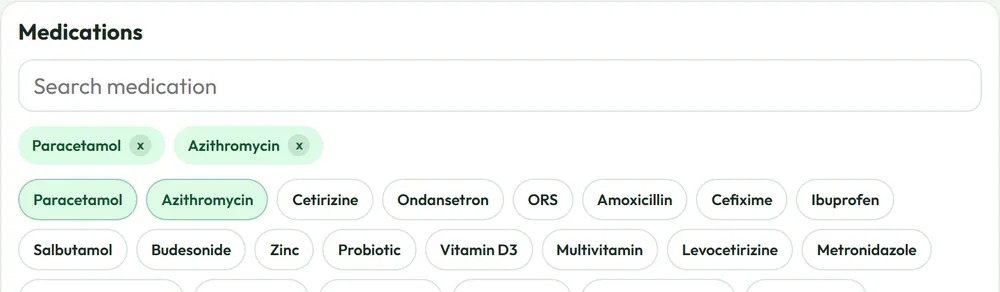
The prescription builder itself learns the clinic: symptoms, findings, diagnosis, medications, and instructions are each a searchable picker that ranks a doctor's own most-used items to the top, with saved templates for the visits that repeat every week. The finished PDF is sent straight to the parent's WhatsApp before they leave the room.
The picker learns per doctor, not per clinic. Two doctors in the same practice can end up with different top suggestions based on what each of them actually prescribes, so the ranking stays useful instead of averaging everyone's habits into one generic list. Saved templates work the same way — a doctor's own shortcuts for the visits that repeat every week, not a shared clinic-wide default that has to be edited around.
The PDF itself carries the clinic's letterhead, the prescribing doctor's name, and the same instructions given out loud during the visit, so a parent isn't trying to reconstruct dosing from a five-minute conversation once they're home. Because it arrives on WhatsApp rather than paper, it's also the copy a parent still has weeks later if a pharmacist or a second doctor needs to see it.
Still handing out photos of handwritten prescriptions?
Book a walkthroughFrom check-in to a prescription in hand.
QR self check-in
A new patient scans a code and fills intake on their own phone — the same form, filled once, not on paper twice.
One-tap approval
Staff review the submission and approve it; the patient record is created automatically, no re-typing.
Picker ranked per doctor
Symptoms, diagnosis, and medications rank each doctor's own most-used items to the top — not a shared clinic-wide list.
Saved templates
Personal shortcuts for the visits that repeat every week, saved per doctor, not edited around a shared default.
PDF before they leave the room
The finished prescription is sent straight to the parent's WhatsApp — no blurry photo of handwriting.
Clinic letterhead, doctor's name
The same instructions given out loud in the room, so a parent isn't reconstructing dosing from memory at home.
Questions about check-in and prescriptions.
How does QR check-in work?
A parent fills the intake form on their own phone before reaching the desk. Staff review and approve it with one tap, and the patient record is created automatically.
How does the prescription reach the parent?
As a PDF sent directly to WhatsApp before the family leaves the room, no printing, no blurry photo of a handwritten slip.
Does the prescription builder save time on repeat visits?
Yes. Symptoms, findings, diagnosis, medications, and instructions are each a searchable picker that ranks a doctor's own most-used items to the top, with saved templates for visits that repeat every week.
See check-in and prescriptions running on your own sample data.
Twenty minutes, real workflow, no script.
Book a walkthrough or chat with us on WhatsApp →